URDF Configuration#
For robot models defined in ik and retargeting configs, you are allowed to flexible edit robot kinematics structures without editing the original URDF files directly:
Load and modify existing URDF models.
Cut the kinematics trees to focus on specific robot parts.
Fix joints at specific values.
Add new links and frames.
Configure mimic joints.
Main Features#
The robot configuration uses the following main components:
basic configuration parameters:
urdf: Path # path to the URDF (required)
srdf: Path | None = None # path to the SRDF (optional)

fix_root_link: bool = False # whether to fix the root link,
""" for IK solving, it is usually set to True,
but for retargeting, it is usually set to False."""

qpos: List[float] = field(default_factory=list) # default qpos for robot model
""" if not set, the robot will use 0 for default. """
cut the kinematics tree to extract specific robot parts:
cut: CutConfig | None = None
@dataclass
class CutConfig(Config):
    root: str
    cuts: list[str] = field(default_factory=list)
How Tree Cutting Works:
The system identifies the specified
rootlinkAll links listed in
cutsare removed along with their childrenThe result is a connected kinematic tree containing the root but excluding cut branches
Example: Remove gripper fingers for Panda robot.
urdf: ${oc.env:MANISKILL_ASSETS}/robots/panda/panda_v2.urdf
fix_root_link: false
cut:
    root: panda_hand
    cuts: [panda_hand_tcp, panda_leftfinger, panda_rightfinger]
Warning
Ensure cut links don’t break essential kinematic chains.
fix joints at specific values:
fixed_joints: dict[str, float] = field(default_factory=dict)
This is useful for:
simplifying complex robots
creating specific robot configurations
reducing degrees of freedom for control
add new links and frames:
new_links: dict[str, JointRecord] = field(default_factory=dict)
@dataclass
class JointConfig(Config):
    parent: str | None = None # parent link name
    pose: PoseConfig = PoseConfig() # relative pose to parent link

@dataclass
class PoseConfig(Config):
    p: list[float] = [0, 0, 0]    # [x, y, z] position
    q: list[float] = [0, 0, 0, 1]    # [w, x, y, z] quaternion
configure mimic joints:
mimic_joints: dict[str, dict] = field(default_factory=dict)


# mimic_joints: {
#     "joint_name": {
#         "mimic": "mimic_joint_name",
#         "multiplier": 1.0,
#         "offset": 0.0
#     }
# }
You can also define the mimic joints directly in the URDF file, and this config will be merged with URDF-defined mimic joints. DO NOT redefine the same mimic joint in both places, as it will cause conflicts.
Note
The configuration system preserves the original URDF file and applies modifications dynamically. This allows you to experiment with different robot configurations without permanently modifying source files.
Test Your Configuration#
python3 tools.py vis_ik <path_to_tele_config>
This will launch a SAPIEN GUI to visualize the robot and verify its kinematics structures, link poses, and joint configurations.
For example in configs/agents/panda/ik_right.yaml:
robot:
    urdf: ${oc.env:MANISKILL_ASSETS}/robots/panda/panda_v2.urdf
    fix_root_link: false
    cut:
        root: panda_hand
        cuts: [panda_hand_tcp, panda_leftfinger, panda_rightfinger]
    qpos: [0.0, 0.392, 0, -1.96, 0, 2.36, 0.785]
    # use default qpos in https://github.com/haosulab/ManiSkill/blob/9561ef04747daa881209a143f2ad8b4bd5a6d98d/mani_skill/agents/robots/panda/panda.py


ik:
    ee_pose_convertor: [q: [0, 1, 0, 0]]
    ee_name: ["panda_hand"]
    fix_joint_indices: []
    n_retry: 0
    max_iterations: 100
    threshold: 1e-3
    use_projected_ik: false # true
    mod_2pi: false # true
python3 tools.py vis_ik configs/agents/panda/tele_right.yaml
This will show the Panda robot without gripper fingers, a pure robot model with only IK-related joints.
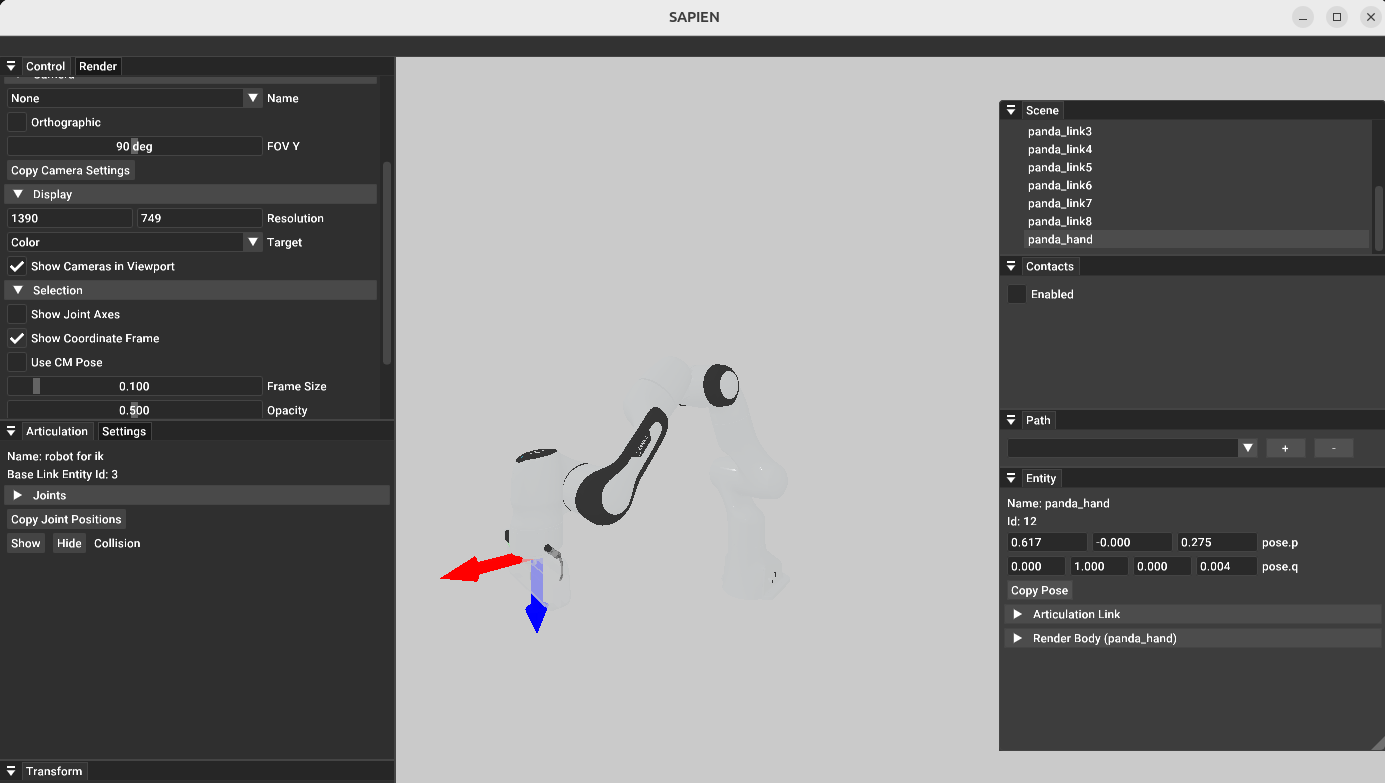
Visualizing the Panda robot with IK configuration in SAPIEN GUI#