Customized Robot#
Each robot has its own teleoperation configuration, which defines how the robot is controlled. It including 6 parts:
ik_solver: <IKSolverConfig>
ik_solver2: <IKSolverConfig> = None, only used for 2 arms robot

retargeting: <RetargetingConfig> = None, only used for dexterous hand robot
retargeting2: <RetargetingConfig> = None, only used for bimanual dexterous hand robot

viewer: Literal["vr_gripper", "vr_hand"], use controller tracking or hand tracking
tele: <TeleConfig>
IK Solver#
ik_solver is used to solve the inverse kinematics problem, which maps the 6D wrist pose / controller pose (xyz position and rotation) to the robot arm qpos.
Below is an example for panda with gripper:
robot:
    urdf: ${oc.env:MANISKILL_ASSETS}/robots/panda/panda_v2.urdf
    fix_root_link: false
    cut:
        root: panda_hand
        cuts: [panda_hand_tcp, panda_leftfinger, panda_rightfinger]

ik:
    ee_pose_convertor: [q: [0, 1, 0, 0]]
    ee_name: ["panda_hand"]
    fix_joint_indices: []
    n_retry: 0
    max_iterations: 100
    threshold: 1e-3
robotdefines the robot model used for IK solving, and it should align with the robot model defined in ManiSkill3.cutspecifies a customized robot model that cuts the robot model starting from therootlink, keeping the root and removing the parts listed incutsto create a pure robot model with only IK-related joints.ikcontains IK solver settings, whereee_nameis a list of end effector names.The IK solver computes the qpos of robot arm joints to make the end effector reach the target pose. It can be understoood as an optimization problem that minimize distance of end effector pose to target pose. If
ee_namecontains multiple end-effectors, the IK solver optimizes each end-effector pose to reach its corresponding target pose jointly.ee_pose_convertorconverts the hand/wrist pose frame to the robot end-effector frame and must be configured for each robot. Check IK Solver Configuration to computeee_pose_convertorfor your robot.Increasing
max_iterationscan improve the accuracy of IK solving but may slow down the teleoperation.thresholddetermines IK solver convergence. If the distance between end-effector pose and target pose is smaller than this threshold, the IK solver is considered converged.
Retargeting#
To teleop dexterous hand robot, retargeting is necessary to map the hand skeleton keypoints to the robot dexterous hand qpos.
Below is an example for floating Ability hand:
wrist_link_name: "base_link"
hand_model:
    urdf: ${oc.env:ASSETS}/agents/floating_hand/ability_hand/ability_hand_right.urdf
    mimic_joints: # it can be empty if the robot hand has no mimic joints, or it can be defined directly in the URDF.
        index_q2: # mimic
        mimic: index_q1 # source
        multiplier: 1.05851325
        offset: 0.72349796
        middle_q2:
        mimic: middle_q1
        multiplier: 1.05851325
        offset: 0.72349796
        ring_q2:
        mimic: ring_q1
        multiplier: 1.05851325
        offset: 0.72349796
        pinky_q2:
        mimic: pinky_q1
        multiplier: 1.05851325
        offset: 0.72349796

target_joint_names: null # skip this

target_origin_link_names:
    ["base_link", "base_link", "base_link", "base_link", "base_link"]
target_task_link_names:
    ["thumb_tip", "index_tip", "middle_tip", "ring_tip", "pinky_tip"]
scaling_factor: [1.0, 1.0, 1.0, 1.0, 1.15] #2.12997759, 1.10168853, 1.04661863, 1.10421217, 1.26760236, 2.3423723]

# Source refers to the retargeting input, which usually corresponds to the human hand
# The joint indices of human hand joint which corresponds to each link in the target_link_names
target_link_human_indices: [[0, 0, 0, 0, 0], [4, 8, 12, 16, 20]]

# A smaller alpha means stronger filtering, i.e. more smooth but also larger latency
low_pass_alpha: 0.2
robotdefines the robot model used for retargeting, and it should align with the robot model defined in ManiSkill3.We use dex-retargeting which treats retargeting as an optimization problem that minimizes the distance between robot link pose vectors and correspoinding human hand skeleton keypoint vectors as defined in
target_origin_link_names,target_task_link_namesandtarget_link_human_indices.
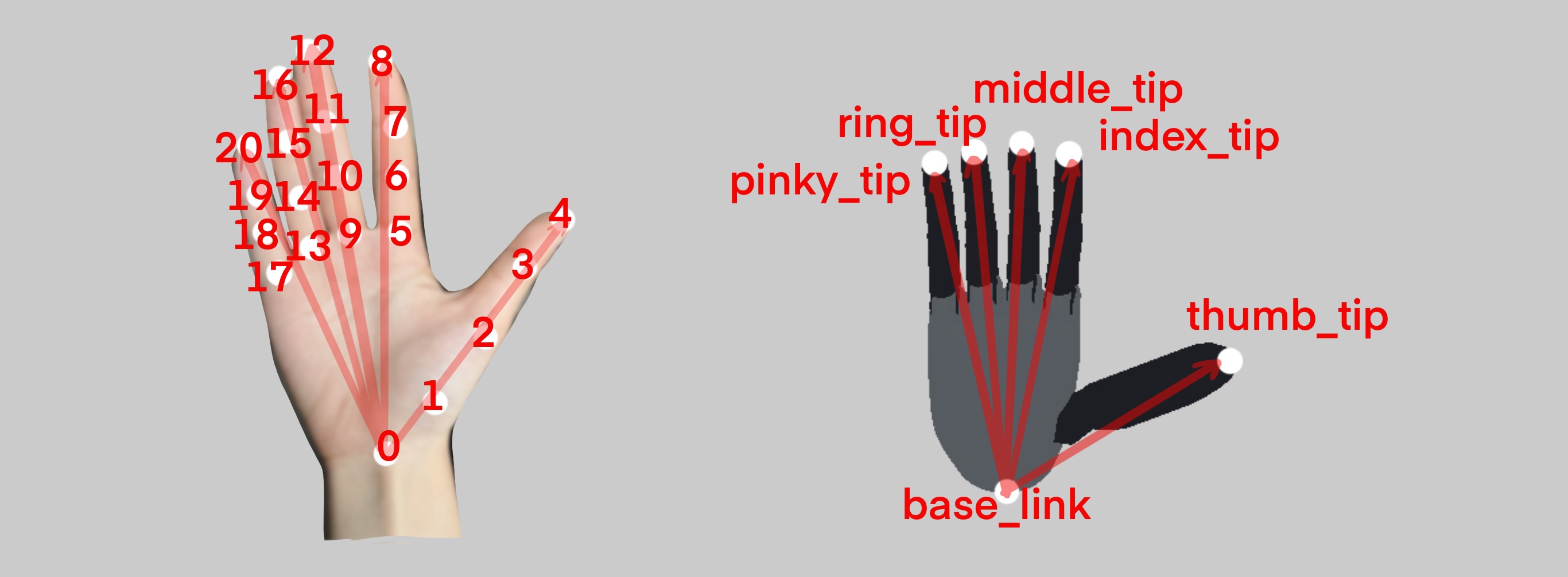
Hand skeleton keypoints vs Robot hand links#
Explanation of retargeting parameters
target_origin_link_names: A list of robot link names that define the starting point of each vector on the robot hand. In this case, all vectors start from “base_link”.target_task_link_names: A list of robot link names that define the endpoint of each corresponding vector. These are “thumb_tip”, “index_tip”, “middle_tip”, “ring_tip”, and “pinky_tip” as shown in the right image.target_link_human_indicesis a 2xN array where:The first row specifies the starting keypoint index of the corresponding human hand skeleton vector.
The second row specifies the ending keypoint index.
Human hand pose is represented by a skeleton of 21 keypoints, each corresponding to a specific joint index as illustrated in the left image.
For example: [0, 0, 0, 0, 0] (start) and [4, 8, 12, 16, 20] (end) define vectors from the wrist (index 0) to each fingertip (indices 4, 8, 12, 16, 20).
Each robot link vector is computed by subtracting the pose of the
target_origin_link_names[i]fromtarget_task_link_names[i], and the corresponding human vector is computed from the respective keypoint indices. The optimizer then minimizes the difference between these sets of vectors.
scaling_factoris used to scale the human hand size to match robot hand size. It’s crucial to set this to the right value to make hand gesture mapping work properly. You can use built-in tools to calibrate the scaling factor:python3 tools.py calibrate <path_to_teleop_config>
While wearing your VR headset, keep your hands flat and open, and make sure the hands are detected by the camera. Hold this gesture for 15 seconds, and the scaling factor will be printed out.
Tele Config#
tele is used to define the teleoperation logic settings. Below is an example for panda with gripper:
order: [right]  # left, right
gripper_action_joint_names: [[panda_finger_joint1]]

reset_state: true
# reset the robot synchronization state when recording is terminated

config:
    _type_: "vr_gripper"
    config: {}
orderis a list of strings, where each string can beleftorright, indicating which hand is used to control the robot arm. The order of the hands corresponds to the order of the robots if there are two robots.gripper_action_joint_namesorhand_action_joint_namesis a list of lists, where each inner list contains the active joint names (mimic sources) of the gripper or hand controlled by the corresponding hand. This is used when the robot has mimic joints, and you can ignore it if the robot has no mimic joints.reset_stateis used to reset the robot synchronization state when environment are reset, i.e. the robot is not in synchronization with your hand or controller at the next environment reset.configare configs for difference teleoperator, there is 2_type_of control logic:vr_gripper,vr_hand, each stands for:vr_gripper: control a single arm with the gripper.vr_hand: control a single arm with hand.If you are using 2 xarm7 arm with gripper, you should set
_type_tovr_gripper, but setorderto[left, right]which means use left hand to control the first robot, and right hand to control the second robot.You can find default config for difference type of teleoperator in
vr_teleop/modules/tele/tele_gripper.pyandvr_teleop/modules/tele/tele_hand.py.
Note
Currently we only support at most 2 arms teleoperation, and the type of robot should be the same, i.e. we can’t control a xarm7 arm with gripper and a xarm7 arm with hand at the same time. Code release WIP.
See example configs in vr_teleop/configs/agents.